My Sunrise Session: From Scouting to Sunrise
Planning Beginner
There’s something almost meditative about chasing a sunrise. The quiet drive through empty streets, the cold air when you step out of the car, the slo...
8 min read
Published February 20, 2026
There’s something almost meditative about chasing a sunrise. The quiet drive through empty streets, the cold air when you step out of the car, the slow glow building on the horizon. But a great sunrise session doesn’t start at dawn — it starts days earlier, when I first spot the opportunity.
This is how I plan a sunrise shoot from start to finish, using ShutterTime to take the guesswork out of it.
Spotting the Opportunity
A few times a week, I open the Upcoming page and scroll through the next seven days. ShutterTime scores every opportunity based on real weather data, cloud layers, wind, and astronomical conditions — so I’m not just guessing whether Sunday morning will be worth the early alarm.
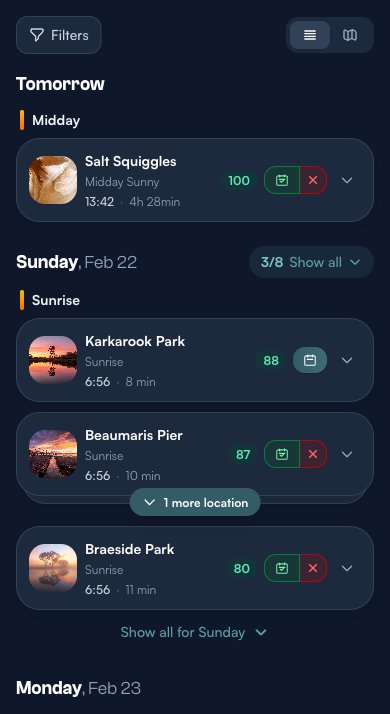
I look for sunrise opportunities with scores in the 80s or above. In this case, Sunday’s looking promising — Karkarook Park at 88, Beaumaris Pier at 87, and Braeside Park at 80. All within 10 minutes of home.
Checking the Conditions
Before I commit, I expand the opportunity card to see exactly what’s going on. This is where ShutterTime really shines — it breaks down every condition that matters for sunrise photography.
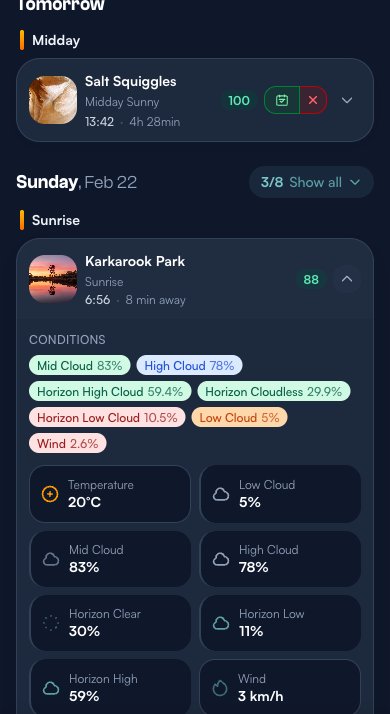
For this Karkarook Park sunrise, I can see 83% mid cloud and 78% high cloud — exactly the kind of cloud coverage that paints the sky with colour. Low cloud is just 5%, so the horizon should be clear. Wind is barely 3 km/h, meaning still reflections if there’s water nearby. The score of 88 makes sense.
Locking It In
Once I’ve found my shoot, I tap the Add to Plan button. ShutterTime creates a plan that tracks this opportunity from now until the moment I’m standing behind the tripod.
I usually plan two or three locations for the same sunrise — that way, if conditions shift, I have options.
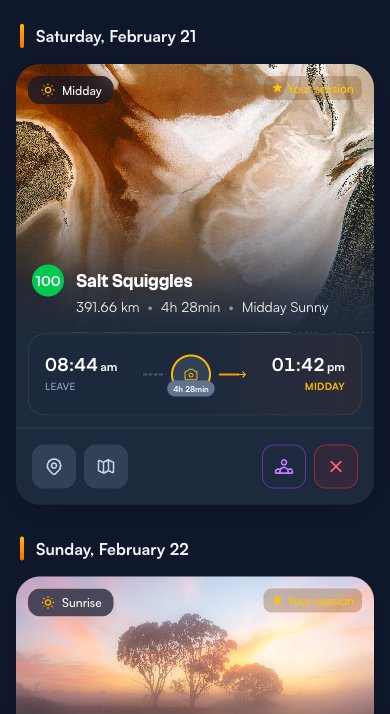
On the Plans page, I can see both sessions side by side. Each card shows the location photo, the score, the distance, and — this is my favourite part — the departure timeline. Beaumaris Pier tells me to leave at 6:16 AM for a 10-minute drive to arrive in time for the 6:56 AM sunrise.
Watching the Score
Over the next few days, ShutterTime keeps recalculating the score as new weather data comes in. This is the part where I obsessively check my phone.
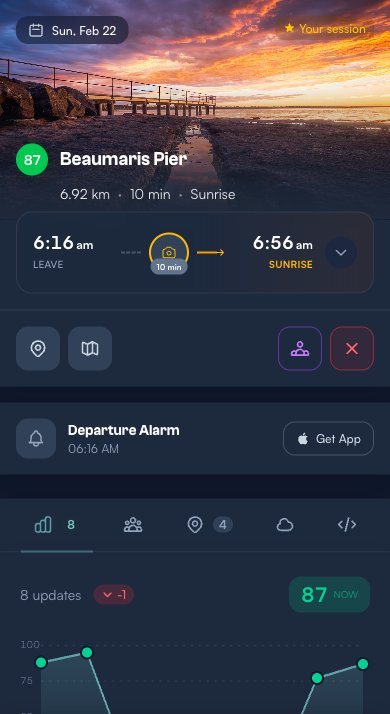
The plan detail page is where everything lives. At the top, the stunning Beaumaris Pier header with the current score — 87 — plus the departure time and distance. The Departure Alarm card shows 06:16 AM, and if I’m using the iOS app, I can set a native alarm right from here.
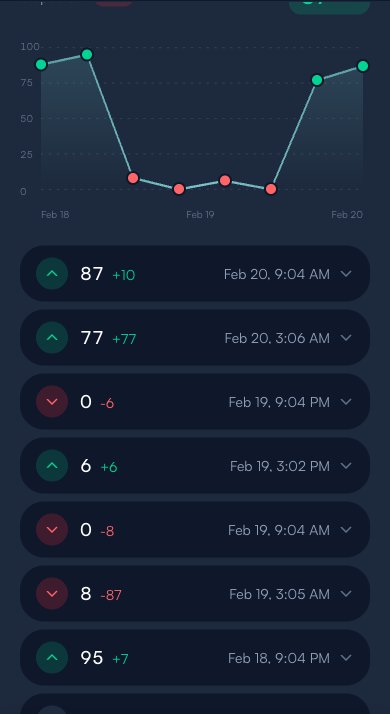
The Score History tab tells the full story. This plan started at 88, dropped to zero on Wednesday when the forecast changed, then climbed back to 87 as conditions improved. That kind of swing is common with sunrise photography — forecasts are volatile days out, but tend to converge as you get closer.
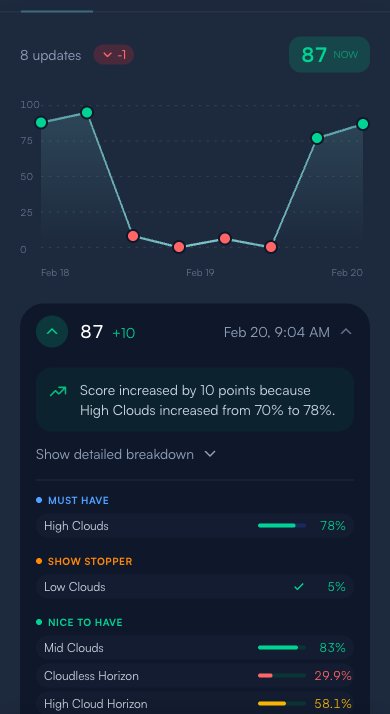
Tapping any score update reveals exactly what changed and why. Here, the score jumped 10 points because high clouds increased from 70% to 78% — and for a sunrise profile, that’s exactly what you want. The condition breakdown shows Must Have, Show Stopper, Nice to Have, and Penalty categories so you can understand the score at a glance.
Staying in the Loop
I don’t want to keep opening the app to check scores. That’s what notifications are for.
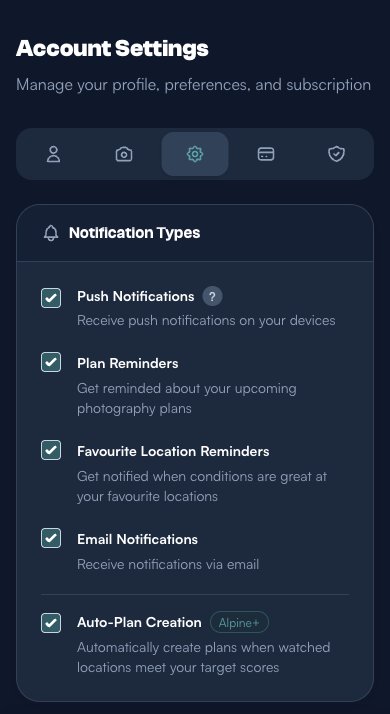
In Account > Preferences, I have Push Notifications and Plan Reminders enabled. I also keep Favourite Location Reminders on — so if a location I love suddenly lights up with a great score, I hear about it even without a plan.
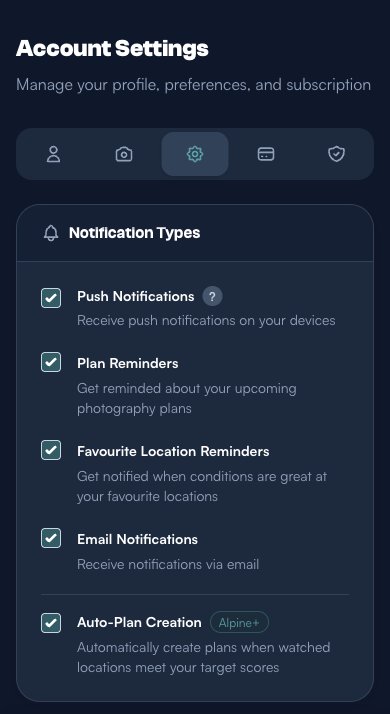
For reminder timing, I use 1 day before, 6 hours before, and 1 hour before. The day-before reminder is my cue to start preparing gear. The 6-hour one hits before bed — a final score check before I commit to the alarm. And the 1-hour reminder is my backup wake-up call.
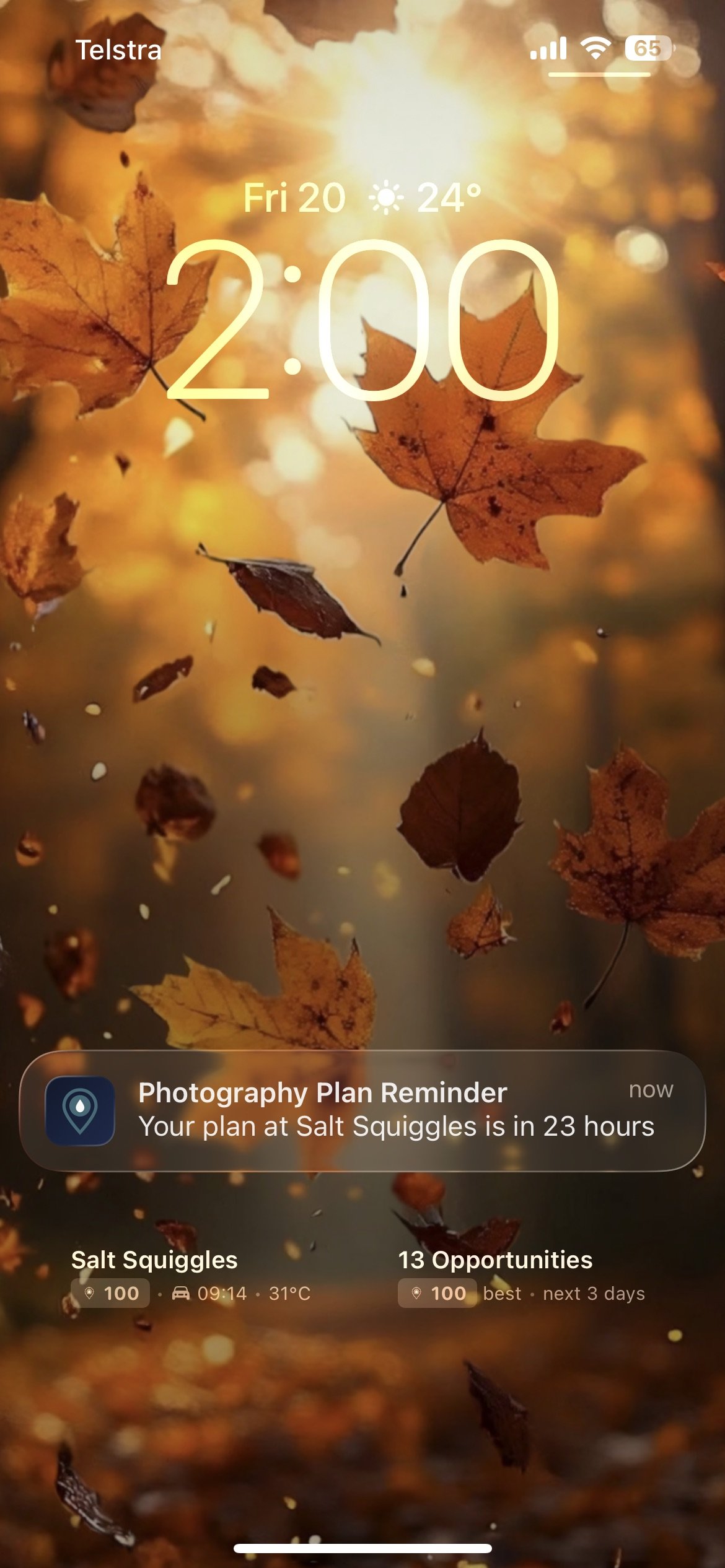
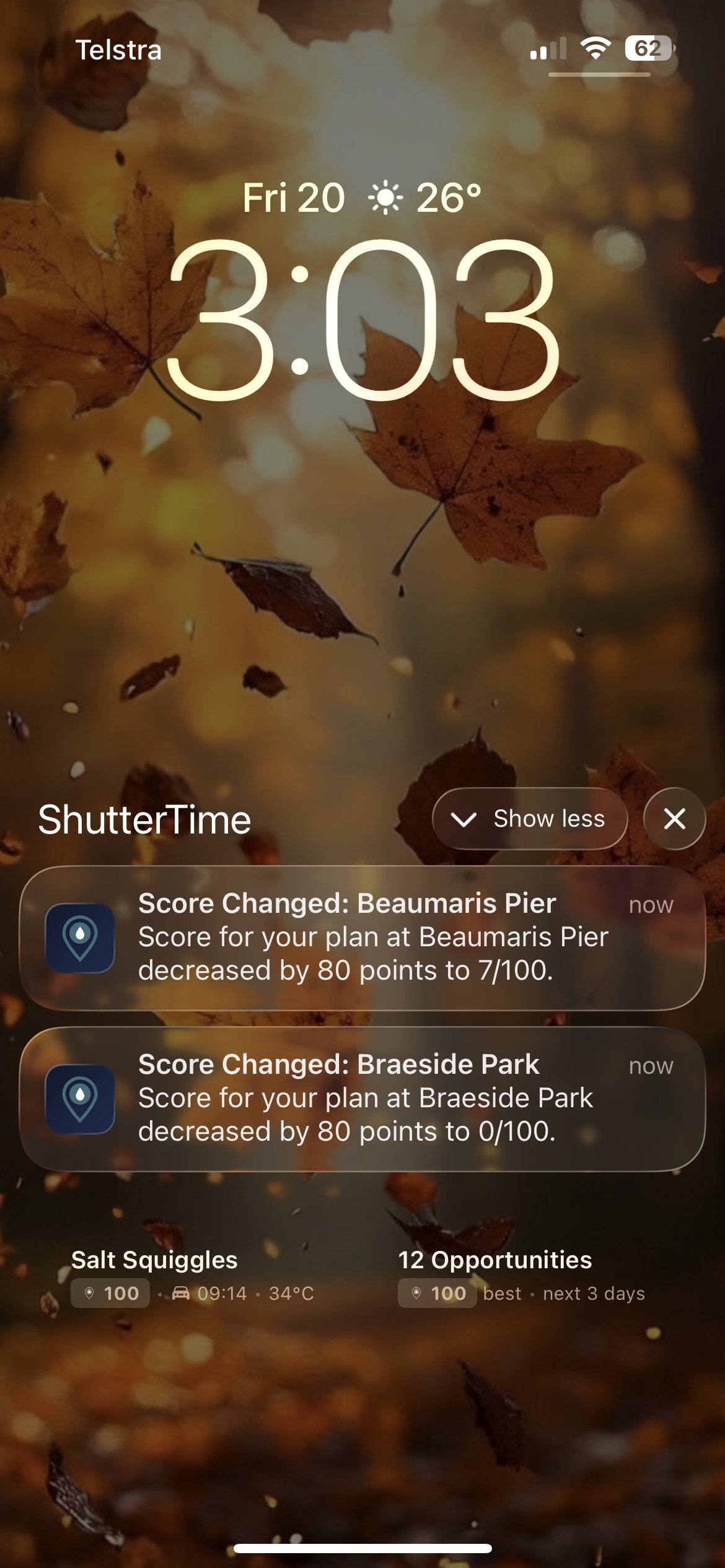
Here’s what those notifications look like on the lock screen — the plan reminder arrives right on schedule, and score changes keep you informed even without opening the app.
The Night Before
The evening before the shoot, I get the 6-hour reminder and do a final check. I open the plan and look at the Weather tab to see the hour-by-hour forecast around sunrise.
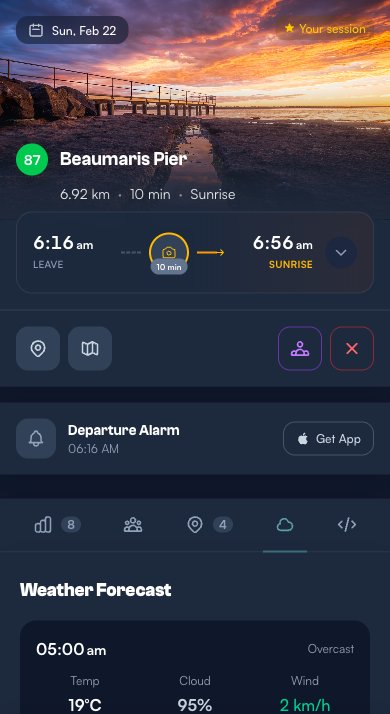
The forecast is looking solid. At 6:00 AM it’s mostly cloudy at 75% coverage with light 3 km/h winds. The PLANNED badge highlights my 7:00 AM slot. Temperature is a comfortable 21°C, so I won’t need heavy layers.
If the score has held or improved, I set my phone alarm for about 5:45 AM — giving me time to get dressed, grab my gear bag, and be out the door by the departure time.
Early Morning — Final Check
When the alarm goes off, the first thing I do — before even getting out of bed — is open the plan one more time. Weather can change overnight, and I want to know if the score has dropped significantly.
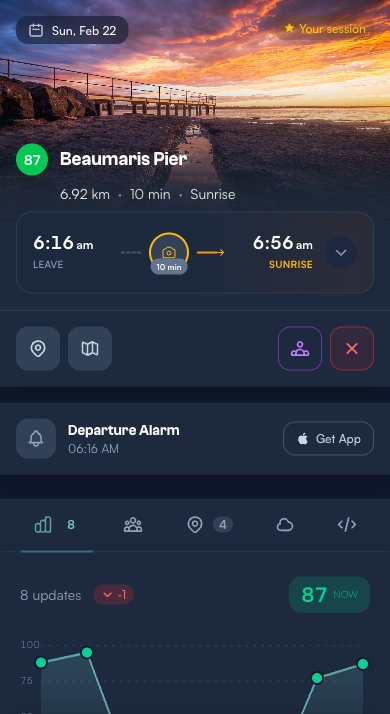
Score is still at 87. We’re going.
I do a quick mental gear check: camera body, wide-angle lens, tripod, spare battery, memory card, lens cloth. For a coastal sunrise like Beaumaris Pier, I might throw in a polariser and ND grad filters too.
Hitting the Road
Time to go. On the plan page, I tap the directions button (the map icon next to the location pin). It opens Google Maps with the destination pre-filled — Beaumaris Pier, 10 minutes away.
The departure timeline on the plan already told me to leave at 6:16 AM to arrive for the 6:56 AM sunrise. ShutterTime calculates this based on my home location and real driving distance, with a buffer to make sure I’m set up and ready before the light starts.
After the Shoot
The sun’s come up, I’ve got my shots, and the golden light is fading. Before I pack up, I record the session in ShutterTime’s Visit History.
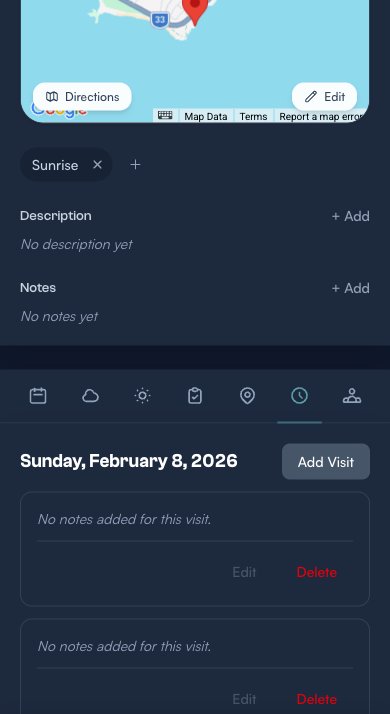
On the location page, I switch to the Visit History tab. Here I can see all my previous visits to this spot — useful for tracking how often I’ve been and what conditions I’ve shot in before.
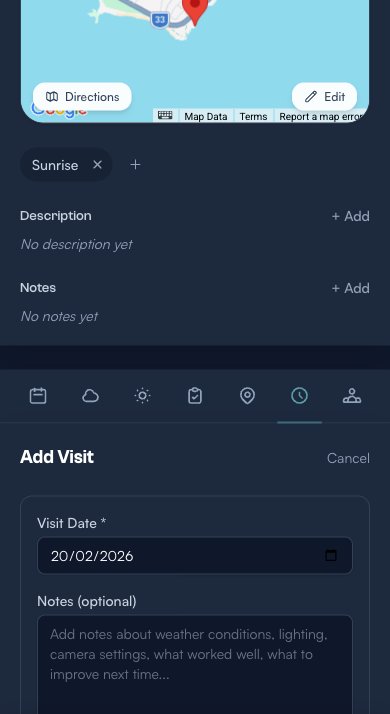
Tapping Add Visit opens the form. I fill in:
- Visit Date — today’s date (auto-filled)
- Notes — I jot down what worked: “Arrived 10 min early, set up on the pier. Mid clouds caught amazing pink and orange. Wind picked up after sunrise — next time arrive even earlier for reflections.”
- Photos — I upload a few of my best frames straight from the camera roll
- Share publicly — I sometimes toggle this on so other photographers in the area can see that conditions were indeed good here
Over time, this visit log becomes a personal journal of every shoot. It’s incredibly useful for learning which conditions actually translate into great photos at each specific location.
Final Thoughts

There’s a feeling that every photographer knows — the one where everything comes together. The light breaks through at just the right angle, the tide pulls back to reveal textures you’ve never noticed, and for a brief moment the world slows down. You press the shutter, and you know. That’s the one.
Photography has a way of pulling you into the present like nothing else. When you’re chasing golden hour along a coastline or waiting for first light in a misty forest, the noise of everyday life fades away. It’s just you, the landscape, and that quiet anticipation. Whether it’s a weekend sunrise session or a spontaneous detour on the way home, these moments in nature are a reset — a reminder of what’s out there beyond the screen.
That’s really what ShutterTime is about. Not just scores and forecasts, but helping you spend more time in those places, at those moments, doing the thing you love. I built it because I’m a photographer too, and I know how good it feels when the conditions align and you come home with something you’re proud of.
So get out there. Drop a pin. Check your score. And go make something beautiful.
What’s Next?
That’s my complete sunrise workflow — from spotting a high-scoring opportunity days ahead, to standing on the pier as the sky lights up. ShutterTime handles the forecasting, the reminders, and the driving logistics so I can focus on what matters: being in the right place at the right time.
If you’re new to ShutterTime, start with these tutorials to build your foundation:
- Getting Started with ShutterTime — set up your account and first locations
- Understanding the Upcoming Page — learn how the dashboard works
- Mastering Photography Profiles — understand how conditions, phases, and scoring work
- Planning Your Photography Sessions — the basics of creating and managing plans
- Favourites & Notifications — set up alerts so you never miss a great shoot